
BLOG
The player page update: a range viewer, switches, and a read that explains itself
Every opponent you have ever sat with now has a page of their own in GTO MAX AI: what kind of player they are and how sure we are, the ranges they actually play in every preflop spot next to the chart they should be playing, the exact adjustments the coach makes against them and why, and a set of switches for the things you know about them that no sample of hands could tell us. This post walks through the new page with real screens, and lists the other changes that shipped alongside it.
1. One page per opponent
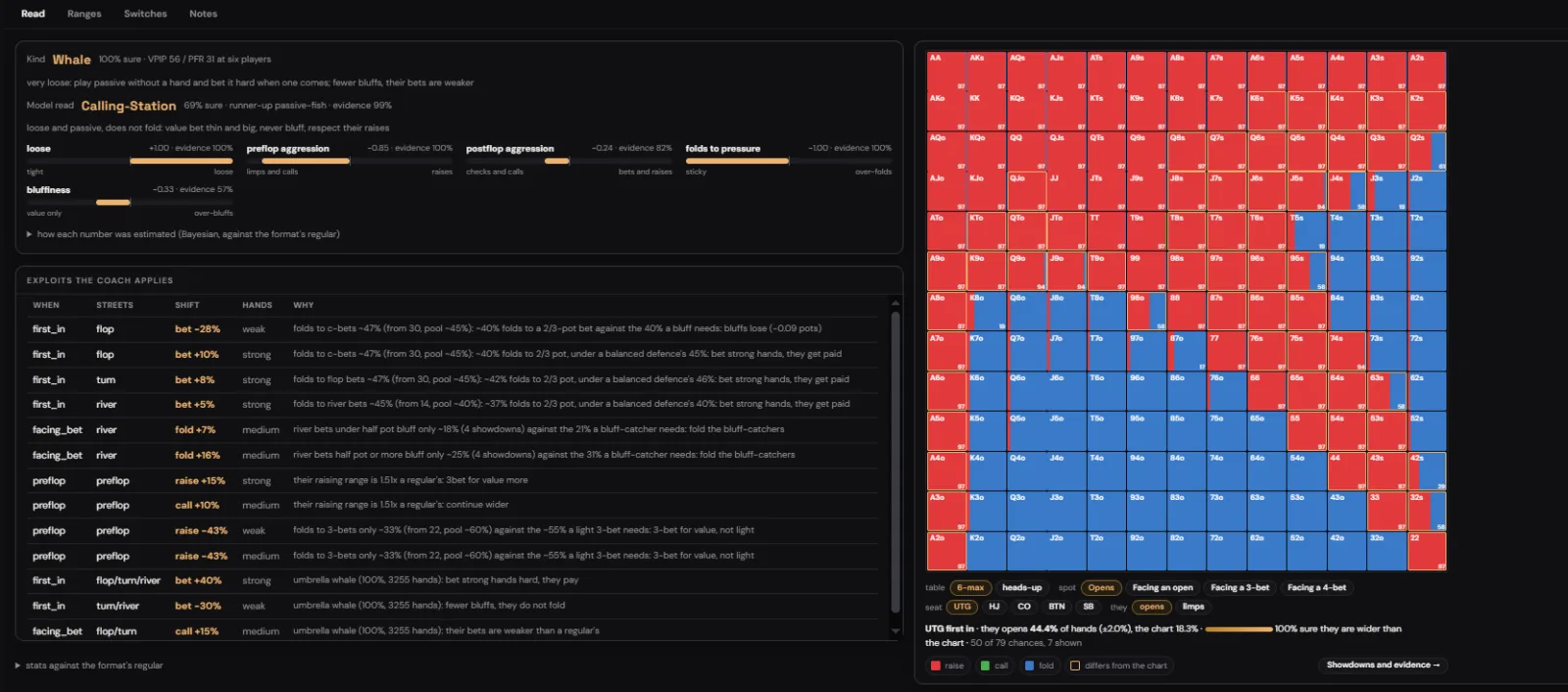
Open the Players tab and you see everyone the app has watched you play against, with their hand count, their type, their key numbers and your notes. Click a name and the page opens with four tabs: Read, Ranges, Switches and Notes. Everything the coach knows about that player is on it, and everything on it is what the coach uses at the table. There is no second, hidden profile.
At the top sits the player's type and a confidence figure. A player with nine hands is a guess and the page says so; a player with three thousand hands is a read, and the page says that too. Next to it is the format the hands came from, because a player's numbers at a full table and at a short one are not the same thing, and we keep them apart.
2. The read, in plain words
The Read tab answers the question you actually have at the table: what is this person, and what do I do about it. The kind of player comes first, whale or calling station or nit or regular, with a one-line description of how they play. Under it, four sliders place them against the regulars of their format: how loose, how aggressive before the flop, how aggressive after it, and how readily they fold to pressure. Each slider shows how much evidence stands behind it, so a reading built on four hands looks different from one built on four hundred.
Then comes the part people asked for most: the table of exploits the coach applies against this player. Each row says when it applies, on which streets, what the shift is, which hands it concerns and why. If the coach bets wider into someone on the flop, the row tells you it is because that player folds to flop bets far more than a balanced defence would, and roughly how much more. If it tells you to call a river bet you would normally fold, the row says their river bets have been bluffs more often than a bluff-catcher needs. You can disagree with any of it, and the Switches tab is where you say so.
3. The range viewer
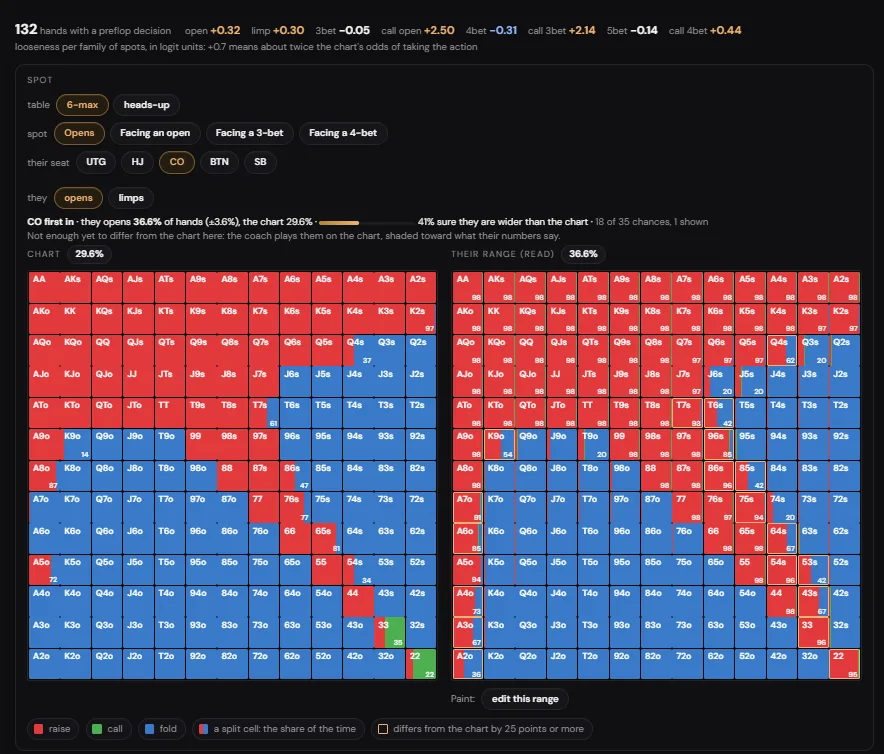
The Ranges tab is new. Pick a table size, a spot (opening, facing an open, facing a 3-bet, facing a 4-bet), the seat and the action, and you get two grids side by side. On the left is the chart range for that spot, the one a solid regular would play. On the right is the range this player actually plays there, as we read it from their hands: every cell shaded by how often they take the action, split cells where they mix, and a yellow outline on every cell that is more than 25 points away from the chart.
Above the grids the page tells you how wide they really are compared with the chart, how many chances we have seen them in that spot, and how sure we are that they differ. Below it a link takes you to the showdowns and the other evidence the reading rests on, hand by hand, so you can check it yourself.
This is the range the coach plays against. When there is enough evidence that a player opens wider or defends tighter than the chart, the solver's inputs move with it, and the lines you see on the overlay move with them. When there is not enough evidence yet, the coach plays them on the chart, shaded toward what their numbers say, and the page tells you that too.
4. Switches: what you know that the numbers cannot
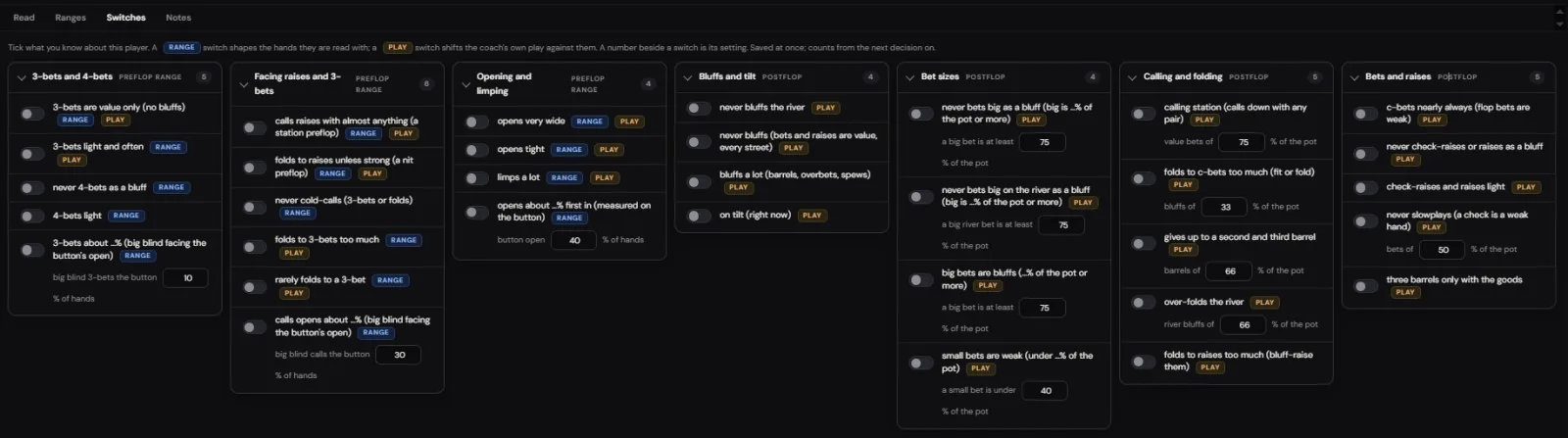
Some things about an opponent you simply know. The regular who never bluffs the river. The friend from your home game who 3-bets light and often. The player two seats to your left who has been on tilt for the last twenty minutes. No stat sample gets there quickly enough, and some of it no sample ever gets to. Switches are how you tell the coach.
They come in groups: 3-bets and 4-bets, facing raises and 3-bets, opening and limping, bluffs and tilt, bet sizes, calling and folding, bets and raises. Each switch is labelled RANGE or PLAY, and some carry both. A RANGE switch changes the hands the player is read with, so "opens very wide" widens the range the solver faces when they open. A PLAY switch changes what the coach does against them, so "never bluffs the river" turns the river calls it would make with bluff-catchers into folds. Where a switch needs a number, the number is beside it: what counts as a big bet, how often the big blind 3-bets the button, how wide a player opens on the button.
Switches save as you tick them and count from the next decision on. They are not a replacement for the model's own reads; they sit on top of it, and they are meant for the players you already know well. Against the thousands you do not, the reads do the work.
5. Also new this month
- Stats by table size. Every number a player has is kept at the table size it was seen at and re-expressed for the table you are at now, so a full-ring nit is not mistaken for a short-handed one.
- Look-alike names. One player, several spellings across rooms or sessions: a button merges them into one profile with one hand count.
- Import your hand histories. Upload the logs your rooms give you and the players in them have pages before you ever sit down with them again.
- Multiway pots. With two or more opponents, every flop, turn and river decision on the GTO line is now priced by expected value against balanced opponents, the player reads on top. We tested the new line against the old one on 60,000 simulated deals against players learned from real hands; it won by 1.3 big blinds per hundred, all of it in the multiway hands.
- The flop library grows. The pre-solved flops that feed the overlay are being extended to every six-max heads-up situation, at the stack depths people actually play and with more bet and raise sizes for both players. The new files come online over the coming weeks, situation by situation, with no update needed on your side.
- Vision reader. A handful of fixes where a badge, a status label or a pop-up over a seat was read as a name or a number.
6. How to use it today
- Open the Players tab. Search a name, a type or a note.
- Open a player. Read the type and the confidence first; it tells you how much weight to give the rest.
- Look at the exploits table. Each row is one adjustment the coach is already making against them, with its reason.
- Open Ranges, pick the spot you care about, and compare the two grids. Follow the evidence link if a cell surprises you.
- For the players you know well, open Switches and tick what you know. The coach applies it from the next decision.
None of this changes how the overlay looks at the table. The GTO line and the Exploit line are where they were; what is new is that you can now open the Exploit line and see exactly what it is made of, and change it when you know better.
GTO MAX AI: the RTA that knows the player.
GTO line, exploit line and the reason, live, on up to four tables, in Chrome. GGPoker, Natural8, ClubGG, PokerNow, CoinPoker, PokerStars, and any room you mark yourself. Try it free for 30 minutes: no sign-up chat, no card.
Start a free 30-minute trialCoaching and study tool. Use it where real-time assistance is allowed: study, home games, private clubs, play money. Most online sites forbid real-time assistance in their terms.
More from the blog
- GTO MAX AI is now trained on 5 million real hands
- How we trained the GTO MAX AI exploit model on 304,000 real hands
- New preflop ranges: what changed in the RTA software this week, with the numbers
- AAPoker is now fully supported: a real-time GTO coach for AAPoker tables, in the browser
Longer reads: the poker RTA guide and all guides.